
Blog and Downloads
MobiFlight Beta – New Unified Project Files

With the latest MobiFlight Beta, we are eliminating the need to download and manage individual .mcc files for every single Core Flight hardware unit (MCP, EFIS, NAV, etc.).
What’s Changing?
- One File per Aircraft: Instead of juggling multiple files for different devices, we are now providing a single .mfproj file tailored for each specific aircraft.
- Unified Setup: This single project file contains everything you need. Just load the specific .mfproj for your aircraft, and all your connected Core Flight device(s) will be configured instantly.
- Less Clutter, More Flying: No more manual alignment or messy folders. Hit “Run” and enjoy your flight!
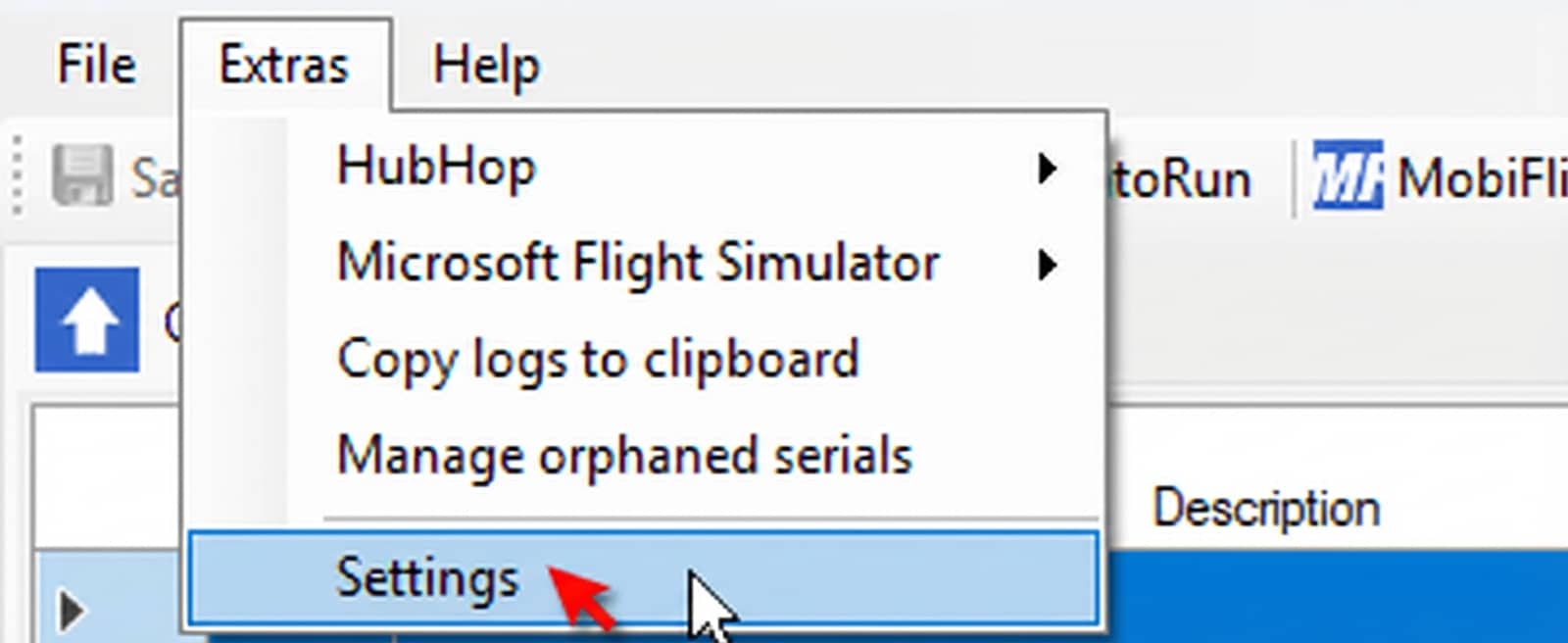
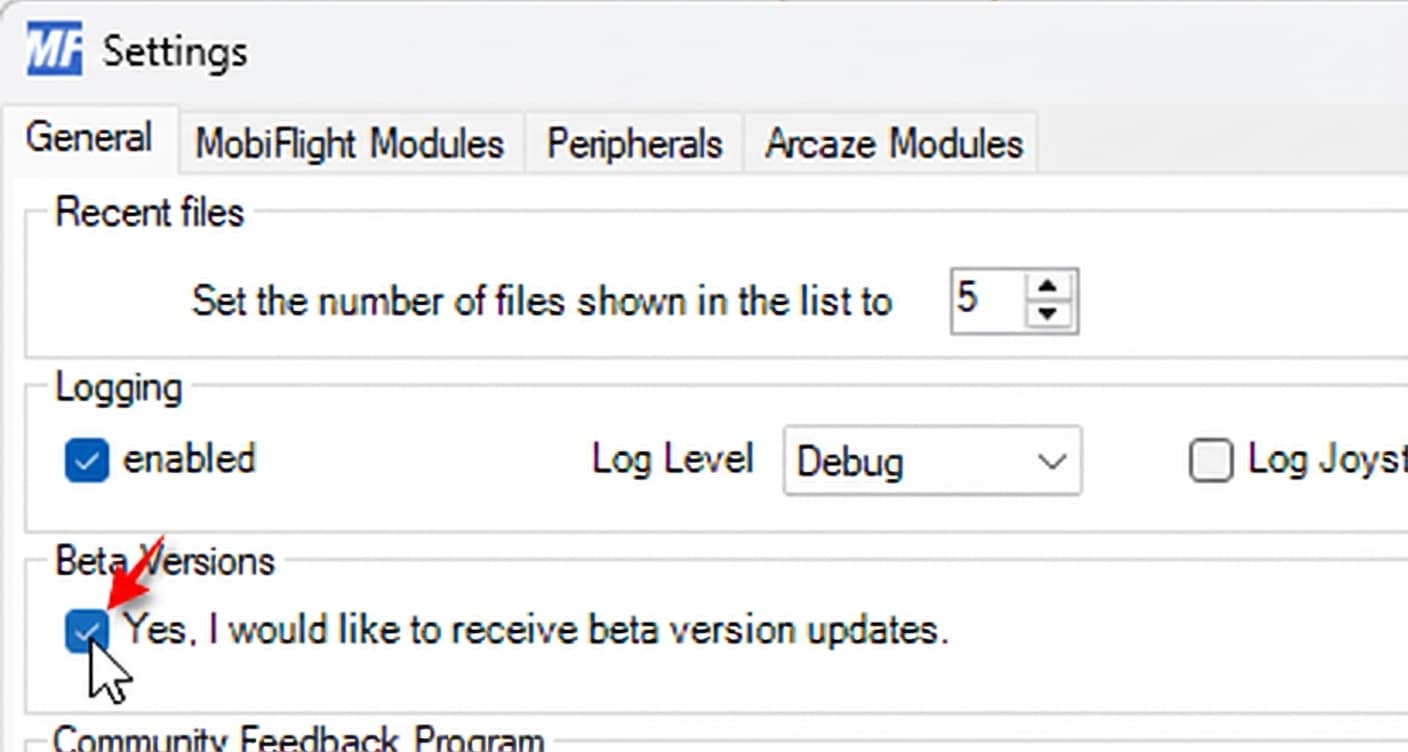
Note: To get this running, just make sure you’ve ticked the “Beta Versions” box under Extras → Settings in your MobiFlight.
Download Project Files
Choose your aircraft below:
- ✈️ MSFS20 – PMDG 737 (All Variants)
Compatible Aircraft: 737-700, 737-700 BDSF, 737-800, 737-800 BCF, 737-800 BDSF, 737-BBJ, 737-BBJ2
Compatible Devices: B737 Compact Overhead Panel, B737 Comm. Radio, B737 Nav. Radio, B737 ADF Radio, B737 ATC Radio, B737 MCP, B737 EFIS Panel
📥 Click to Download - ✈️ XP12 – Zibo 737
Compatible Aircraft: B737-800X (4k)
Compatible Devices: B737 Compact Overhead Panel, B737 Comm. Radio, B737 Nav. Radio, B737 ADF Radio, B737 ATC Radio, B737 MCP, B737 EFIS Panel
📥 Click to Download
How to Install and Use
Follow these simple steps to set up your Core Flight hardware with MobiFlight:
- Install MobiFlight
• Download and install MobiFlight - Enable Beta Version
• Open MobiFlight
• Go to Extras → Settings
• Check the “Beta Versions” box
• Click OK - Update MobiFlight
• Close and restart MobiFlight
• A pop-up will appear: “New version is available, please update now”
• Click “Yes” to update - Download Your Project File
• Download the .mfproj file for your aircraft (see download links above) - Load the Project File
• Go to Mobiflight
• Click File → Open (top-left corner)
• Select the downloaded .mfproj file - Run and Enjoy!
• In the “All Projects” section, select your project
• Click the “Run” button
• Start flying!
If you need help, please contact us via Facebook, Discord, or e-mail.
Best Regards,
Core Flight Tech. Team
Related Posts
Compact 737 Overhead Panel — Setup Guide & Downloads

The Compact 737 Overhead Panel brings essential Boeing 737 overhead controls to your home simulator setup without the cost and space r...
Compact 737 Overhead Panel – Mobiflight Files

MobiFlight files are now available. Download the one that matches your setup and use it with your Compact OVH B737!
Install Driv...
MobiFlight <-> Custom A32X Overhead Panel
In this section, you will learn how to set up your Compact Overhead Panel with MobiFlight step by step.The installation process has bee...
Ultra-Compact A32X Overhead Panel
In this section, you will learn how to set up your Ultra-Compact Overhead Panel with MobiFlight/SPAD.neXt step by step.The installation...
PROSIM Integration -BETA-
On this blog page, you can find out how to connect CFT B737 MCP to ProSim via our software.First, you will need to download "Uploader"....
A320 FCU Connection with MobiFlight
Everything you need to run the FCU via MobiFlight is on this blog page.
Steps:
Install Driver
Install Mobiflight
Download...
How to connect Landing Gear Lever via Mobiflight? (MSFS2020/XP11/P3D)
Everything you need to complete the installation of the Landing Gear Lever via Mobiflight is on this blog page.
Steps:
Install&n...
How to connect ATC Radio Module Mobiflight? (MSFS2020/XP11/P3D)
Everything you need to run the ATC Radio Module via Mobiflight is on this blog page.
ATC Module has two different hardware versions:...
How to connect the ADF Radio Module Mobiflight? (MSFS2020/XP11/P3D)
Everything you need to run the ADF Radio Module via Mobiflight is on this blog page.
Steps:
Install Driver
Install ...
How to connect Nav. Radio Module Mobiflight? (MSFS2020/XP11/P3D)
Everything you need to run the Nav. Radio Module via Mobiflight is on this blog page.
Steps:
Install Driver
Install ...
How to connect Comm. Radio Module Mobiflight? (MSFS2020/XP11/P3D)
Everything you need to run the Comm. Radio Module via Mobiflight is on this blog page.
Steps:
Install Driver
Install&nbs...
How to Connect MCP with SPAD.neXt?
SPAD.neXt is a software bridge/connector between the Modules and the Flight Simulator.You can edit, release, and save any configuration...